A smartphone speaker is one of those components we rarely think about until it…
Read More

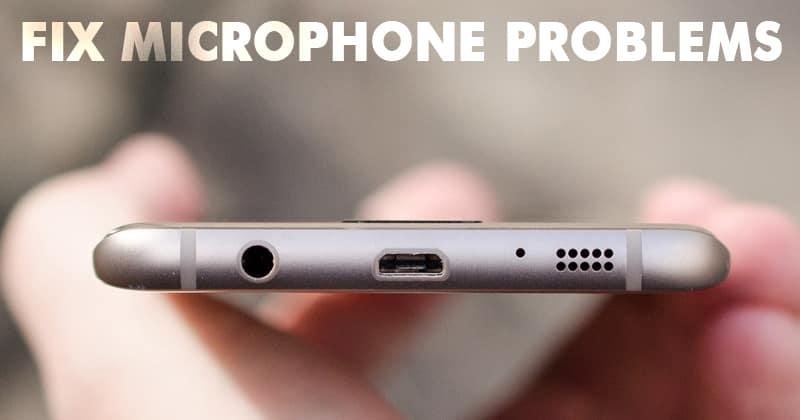
Have you ever made a phone call and heard the other person say, “Your voice is not coming clearly”? Or perhaps your WhatsApp voice messages contain no sound, your voice recordings are unusually quiet, or your smartphone microphone has suddenly stopped working.
A mobile microphone problem can make even a perfectly functioning smartphone difficult to use. You may still be able to browse the internet, watch videos, and use applications, but calling and voice communication become frustrating.
If you are searching for a mobile mic problem in Jaipur, it is important to understand that microphone issues do not always mean the mic component is damaged. Dust, incorrect permissions, Bluetooth connections, software errors, liquid exposure, and internal hardware faults can all affect voice input.
This guide explains why a phone microphone may stop working, how to troubleshoot common problems safely, when professional repair is required, and what to consider before choosing a mobile repair service in Jaipur.
What Is a Mobile Microphone and How Does It Work?
A mobile microphone is an electronic component that converts your voice and surrounding sound into an electrical signal that the smartphone can process.
Modern smartphones may contain multiple microphones positioned around the device. Depending on the model, these microphones can support:
- Normal phone calls.
- Speakerphone calls.
- Voice recordings.
- Video recording.
- Voice messages.
- Noise reduction.
- Voice assistant functions.
Different microphones may be used for different purposes. This is why a smartphone can sometimes record clear audio in one application but fail to capture your voice properly in another.
For example, if your voice sounds clear during a video recording but is barely audible during normal calls, the problem may involve a particular microphone, audio routing, or call-related software rather than every microphone in the phone.
A proper diagnosis helps identify the affected function before any component is replaced.
10 Common Mobile Microphone Problems
1. Phone Microphone Not Working During Calls
One of the most common complaints is that the other person cannot hear your voice during a normal phone call.
You may hear the caller clearly, but they may hear silence, occasional words, or very faint audio.
Possible causes include:
- A blocked microphone opening.
- A damaged microphone component.
- Incorrect audio routing.
- Software-related problems.
- Internal connector damage.
- Liquid exposure.
Before requesting mobile microphone repair in Jaipur, test the microphone using another application and check whether the problem occurs during every call.
2. Mobile Mic Sound Is Too Low
Sometimes the microphone works, but your voice sounds distant or unclear.
This may happen when dust or debris blocks the microphone opening. A protective case or accessory may also cover the microphone incorrectly.
Other possible causes include microphone damage, poor network conditions during calls, or software-related audio processing.
If your voice is consistently quiet across different applications, the microphone or its surrounding components may require inspection.
3. WhatsApp Voice Message Mic Problem
A smartphone microphone may appear to work during normal calls but fail when recording WhatsApp voice messages.
This can happen because of application permissions, audio routing, temporary software errors, or a microphone-related hardware problem.
Check whether WhatsApp has permission to access the microphone.
On Android, microphone permissions can usually be reviewed through the application’s settings or the phone’s Privacy settings.
On iPhone, microphone access for supported applications can be reviewed in Settings under Privacy & Security.
If the problem occurs only in WhatsApp, check the application before assuming that the microphone needs replacement.
4. Phone Mic Not Working on Speakerphone
Some smartphones use different microphones or audio-processing configurations during normal calls and speakerphone calls.
If your voice is clear during a normal call but unclear when speakerphone is enabled, the phone may be using another microphone or a different audio path.
This symptom can help narrow down the problem, but it does not confirm which component is faulty.
A technician may need to test the microphones separately.
5. Microphone Not Working During Video Recording
If your videos contain no voice or the audio sounds distorted, the microphone used for video recording may be affected.
Possible causes include:
- Microphone obstruction.
- Incorrect application permissions.
- Camera application problems.
- Software errors.
- Internal microphone damage.
Try recording a short video using the front and rear cameras.
If one recording mode captures sound clearly while another does not, mention this difference during diagnosis.
6. Mobile Mic Problem After Water Damage
Liquid exposure can affect smartphone microphones and nearby electronic components.
After water exposure, the microphone may produce muffled sound, intermittent audio, or no sound at all.
If your phone gets wet:
- Switch it off if possible.
- Disconnect the charger.
- Do not attempt to charge the device.
- Avoid using a hairdryer or direct heat.
- Do not insert sharp objects into the microphone opening.
- Arrange professional inspection if the problem continues.
Even if the phone appears to work normally, liquid exposure can cause corrosion that develops later.
7. Phone Microphone Produces Distorted Voice
Your voice may sound robotic, crackling, or unclear during calls and recordings.
Possible causes include microphone damage, debris, liquid exposure, software processing, or a problem with the audio circuit.
If distortion continues across multiple applications, professional diagnosis may be necessary.
8. Microphone Works Intermittently
A microphone may work for a short time and then stop capturing sound.
Intermittent problems may involve a damaged component, connector issue, software error, or internal circuit fault.
If the issue started after a drop or physical impact, tell the technician about the incident.
9. Voice Assistant Cannot Hear You
If your phone’s voice assistant does not respond to your voice, the problem may involve microphone permissions, assistant settings, background restrictions, or microphone functionality.
Test the microphone using a voice recording application before concluding that the hardware is defective.
10. Phone Microphone Stops Working After an Update
Sometimes a microphone problem appears after a software update or application installation.
The issue may be related to permissions, temporary system errors, or application compatibility.
Restart the phone and check whether another software update is available.
If the problem continues, further troubleshooting may be required.
How to Fix a Mobile Mic Problem at Home
Before visiting a repair shop, try these safe troubleshooting steps.
Step 1: Restart Your Smartphone
A restart can resolve temporary software or audio-related errors.
After restarting, test the microphone using a voice recording application.
Step 2: Check Microphone Permissions
Make sure the application you are using has permission to access the microphone.
If microphone access is disabled, the application may not capture your voice even when the hardware is working properly.
Step 3: Disconnect Bluetooth Devices
Your phone may be using a connected Bluetooth headset or another audio device.
Turn off Bluetooth temporarily and test the built-in microphone again.
Step 4: Remove the Phone Case
Some cases may partially cover the microphone opening.
Remove the case and make a short recording to check whether the audio improves.
Step 5: Test Different Applications
Try recording a voice note, making a call, and recording a short video.
This helps identify whether the problem occurs across the phone or only in a particular application.
Step 6: Clean the Microphone Opening Carefully
Use a soft, dry brush to gently remove visible dust from the exterior opening.
Do not insert pins, needles, or sharp objects into the microphone hole. These can damage the microphone or protective mesh.
Avoid pouring liquids or spraying cleaning products directly into the opening.
Step 7: Check Software Updates
If the problem started after a software update, check whether another update or recommended troubleshooting step is available.
Back up important data before performing a factory reset.
If these steps do not resolve the issue, professional inspection may be the next step.
When Does a Phone Need Professional Mic Repair?
A professional inspection may be necessary if:
- Your voice cannot be heard during calls.
- Voice recordings contain no sound.
- The microphone works only occasionally.
- Audio remains distorted after basic troubleshooting.
- The problem started after a phone drop.
- The microphone stopped working after liquid exposure.
- Multiple applications have the same microphone problem.
For customers searching for phone mic not working solutions in Jaipur, sharing the exact smartphone model and explaining when the problem started can help the repair provider understand the issue.
Mobile Mic Repair vs Microphone Replacement
Not every microphone problem requires a complete component replacement.
The appropriate repair depends on the cause.
| Problem | Possible Solution |
|---|---|
| Microphone opening blocked | Careful external cleaning |
| Application cannot access mic | Permission or software correction |
| Temporary audio error | Restart or software troubleshooting |
| Damaged microphone component | Mic replacement may be required |
| Connector-related fault | Connector inspection or repair |
| Liquid damage | Internal inspection and appropriate repair |
| Audio circuit problem | Component-level diagnosis |
A technician should identify the affected microphone and related components before recommending a repair.
How Much Does Mobile Mic Repair Cost in Jaipur?
The cost of mobile mic repair Jaipur services depends on the smartphone model, microphone design, replacement-part availability, and repair complexity.
Some microphone components are relatively straightforward to access, while others may be integrated into a charging board, flex cable, or another assembly.
The main cost factors include:
- Smartphone brand and model.
- Microphone component type.
- Replacement-part availability.
- Labour and disassembly requirements.
- Additional damage caused by liquid or impact.
- Whether circuit-level repair is required.
There is no single price that applies to every smartphone.
For an accurate estimate, provide the exact model and explain whether the microphone fails during calls, recordings, or all applications.
Before approving the repair, ask whether the quotation includes the component, labour, testing, and applicable warranty.
Mobile Mic Repair for Different Smartphone Brands
Microphone problems can occur across different smartphone manufacturers. The repair procedure depends on the model’s internal design.
iPhone Microphone Repair
iPhones may use multiple microphones for calls, recordings, and noise reduction.
Common symptoms include unclear call audio, voice recording problems, and microphone failure in certain applications.
The affected microphone should be identified before recommending replacement.
Samsung Mobile Mic Repair
Samsung Galaxy smartphones use different microphone configurations across models.
Repair enquiries may involve low voice volume, microphone failure during calls, or audio problems after physical damage.
Vivo and Oppo Mic Repair
Vivo and Oppo devices may develop microphone problems related to dust, liquid exposure, component damage, or software issues.
The appropriate repair depends on the particular model and affected audio function.
Xiaomi and Redmi Mic Repair
Xiaomi and Redmi smartphones may experience microphone problems during calls, voice messages, or video recording.
Testing different applications can help identify whether the issue is software-related or hardware-related.
Realme and OnePlus Mic Repair
Realme and OnePlus devices may also require microphone inspection after physical damage, liquid exposure, or component failure.
Customers should confirm repair availability for their specific model before visiting.
How to Choose a Mobile Mic Repair Shop in Jaipur
When searching for a mobile repair shop in Jaipur, consider more than the advertised repair price.
Check the Repair Provider’s Experience
Ask whether the provider handles your smartphone model and microphone-related faults.
Different phones may use different microphone assemblies and repair procedures.
Ask for a Proper Diagnosis
A repair recommendation should explain why the microphone is not working.
If the problem is caused by permissions or software, replacing the microphone may not solve it.
Confirm the Repair Estimate
Ask for a clear quotation before approving the work.
The estimate should explain the repair or replacement required and any additional charges.
Understand the Warranty
If a repair warranty is offered, ask what it covers and how long it lasts.
Warranty conditions may vary depending on the component and repair performed.
Protect Your Personal Data
Microphone repair generally should not require sharing banking passwords or OTPs.
Back up important files when possible and avoid sharing sensitive information unnecessarily.
Why Consider Galaxmial Predera for Mobile Mic Repair Enquiries?
Galaxmial Predera Communication Pvt. Ltd. is a Jaipur-based mobile phone, smartphone accessories, battery, and electronics solutions business.
Located at Ganpati Plaza on M.I. Road, the business provides a local contact point for customers looking for mobile and technology-related assistance.
Customers experiencing a microphone problem can contact Galaxmial Predera to explain their smartphone model and symptoms and enquire about available repair options.
The business also serves customers looking for smartphone-related products and other mobile solutions.
7 Tips to Protect Your Smartphone Microphone
Taking care of your smartphone can help reduce avoidable microphone problems.
- Keep microphone openings free from visible dust.
- Use a protective case that does not block the microphone.
- Avoid exposing the phone to excessive moisture.
- Do not insert sharp objects into microphone openings.
- Install software updates from trusted sources.
- Avoid using damaged accessories that interfere with audio connections.
- Get persistent microphone problems checked instead of repeatedly testing the device at high volume.
These habits cannot prevent every microphone failure, but they can help maintain normal smartphone use.
Frequently Asked Questions
1. Why is my mobile microphone not working?
A mobile microphone may stop working because of blocked openings, incorrect permissions, software problems, liquid exposure, physical damage, or a faulty microphone component.
2. Why can people not hear me during phone calls?
The problem may involve the microphone, audio routing, call settings, or a software issue. Test the microphone using another application to help narrow down the cause.
3. Can a mobile microphone be repaired?
Some microphone problems can be resolved through cleaning, software troubleshooting, connector repair, or component replacement. The correct solution depends on the diagnosis.
4. How much does mobile mic repair cost in Jaipur?
The cost depends on the smartphone model, microphone type, replacement-part availability, and repair complexity. Contact a repair provider with your device details for an estimate.
5. Why does my microphone work in WhatsApp but not during calls?
Different applications and phone functions may use different microphones or audio configurations. The issue may involve a particular microphone, call settings, or software.
6. Can water damage affect a mobile microphone?
Yes. Liquid exposure can affect microphone performance and may damage internal components. Switch off the phone, avoid charging it, and seek professional inspection.
7. Does Galaxmial Predera provide mobile mic repair in Jaipur?
Customers can contact Galaxmial Predera to enquire about microphone repair availability for their smartphone model and specific problem.
8. Where is Galaxmial Predera located in Jaipur?
Galaxmial Predera Communication Pvt. Ltd. is located at G-46, Ground Floor, A-Block, Ganpati Plaza, M.I. Road, Jaipur, Rajasthan, India.
Conclusion
A mobile microphone problem can affect phone calls, voice messages, video recordings, and everyday communication.
If your phone mic is not working, start by checking permissions, Bluetooth connections, microphone openings, and software settings. These simple steps may resolve certain problems without requiring hardware repair.
If the issue continues, a proper diagnosis can help identify whether the microphone, connector, or another internal component is responsible.
For customers searching for mobile mic problem in Jaipur, Galaxmial Predera is a local mobile and electronics solutions business you can contact to discuss your smartphone and enquire about available repair options.

Mobile Repairing Shop
Mobile Repair
Nothing Phone battery replacement in Jaipur becomes necessary when the battery can no longer…
Read More
Mobile Repair
Smartphones have become an essential part of everyday life, helping us manage communication, work,…
Read More