A smartphone battery plays a crucial role in the performance and reliability of your…
Read More

Introduction
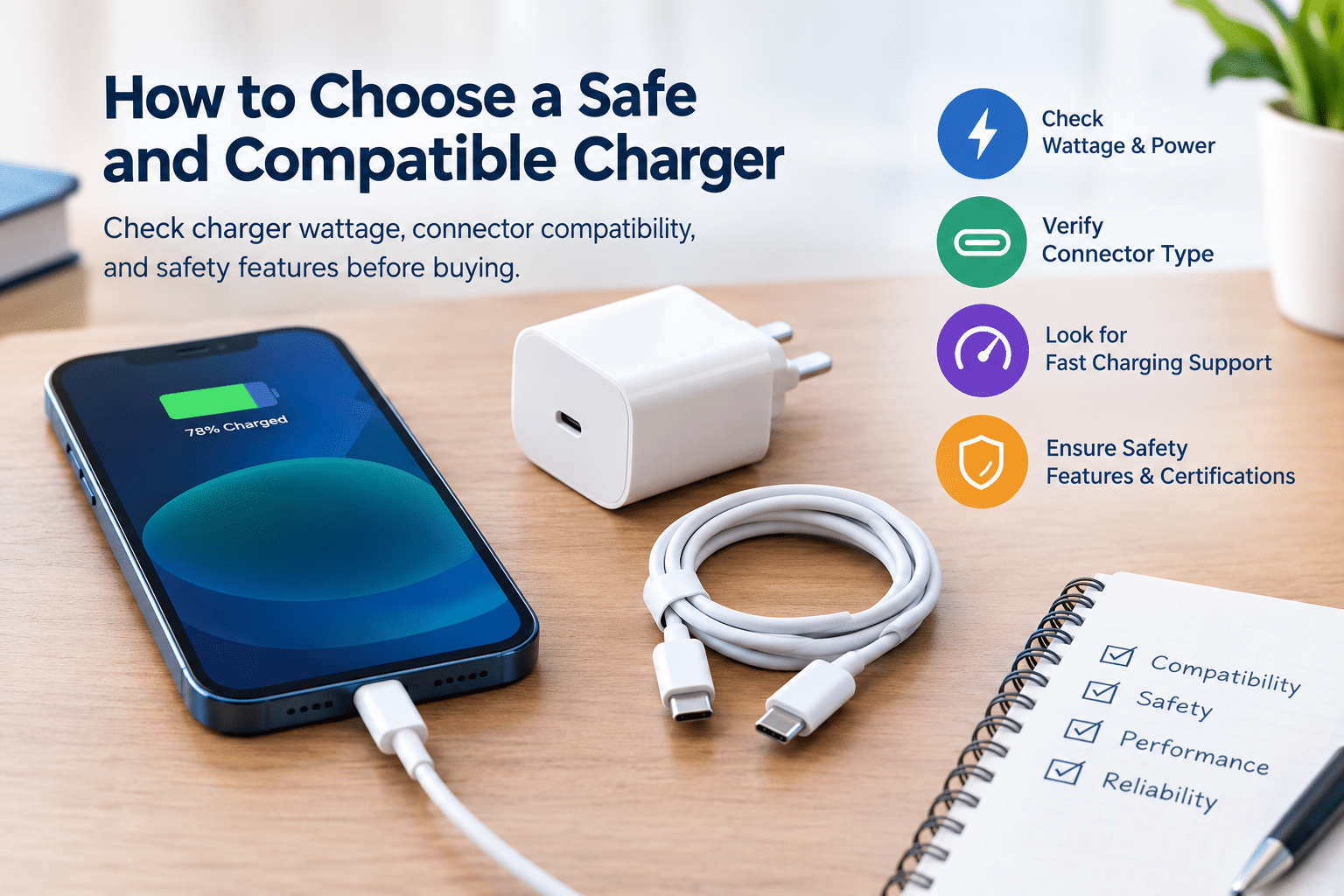
Choosing the right charger is an important part of keeping your smartphone, tablet, and other electronic devices working reliably. A charger that matches your device’s requirements can provide suitable charging speeds, support normal battery operation, and reduce the risks associated with poor-quality electrical accessories. However, a charger that fits your phone’s charging port is not necessarily compatible with every charging feature your device supports.
With so many charging adapters, USB cables, fast-charging technologies, and third-party accessories available, knowing how to choose a safe and compatible charger can feel confusing. Some chargers offer higher wattage, while others advertise fast charging or universal compatibility without clearly explaining their specifications.
The good news is that selecting a suitable charger does not require advanced technical knowledge. You need to understand your device’s charging requirements, connector type, supported charging protocols, and the safety features that distinguish a reliable charger from a questionable one. This guide explains what to check before buying a charger so you can make an informed decision.
Why Charger Compatibility Matters
Charger compatibility affects charging performance, convenience, and electrical safety. A suitable charger provides power according to the requirements supported by your device. An unsuitable charger may charge slowly, fail to activate fast charging, disconnect frequently, or behave unpredictably.
There are two important aspects of compatibility:
- Physical compatibility: The connector and cable fit the device’s charging port.
- Electrical compatibility: The charger supports the voltage, current, power levels, and charging protocols required by the device.
For example, a USB-C connector may fit a smartphone, tablet, or laptop, but that does not mean every USB-C charger supports the same power output or charging speed.
Device manufacturers publish charging recommendations in user manuals, support pages, and official product specifications. Checking these details before purchasing helps you select a compatible phone charger rather than relying only on appearance or packaging claims.
Check Your Device’s Charging Requirements
Before comparing charger prices or wattage, identify the charging specifications of your device. These details help you avoid paying for unnecessary power or buying an adapter that cannot deliver the charging performance you need.
Understand Charger Wattage
Wattage, measured in watts (W), describes the electrical power a charger can provide under specified conditions. It is one of the most commonly advertised charger specifications.
Two other important measurements are voltage and current:
- Voltage (V): The electrical potential supplied by the charger.
- Current (A): The amount of electrical current flowing through the charging connection.
- Power (W): The rate at which electrical energy is delivered.
For a basic DC power calculation, watts equal volts multiplied by amps. For example, a 5 V, 2 A output provides 10 W of power.
When reviewing charger wattage explained guides or product labels, remember that a charger’s maximum advertised wattage is not necessarily the power your device will draw throughout charging. Actual power depends on the charger’s supported output modes, the device’s charging limits, the cable, and operating conditions.
To find the appropriate wattage, check your device manufacturer’s official specifications or user manual. Choose a charger that supports the recommended power level and any charging protocol your device requires.
Check Voltage and Current Requirements
Voltage and current matter because charging equipment must operate within compatible electrical limits. A charger may advertise several output combinations, such as 5 V, 9 V, or 12 V, rather than supplying every voltage at once.
Modern USB charging systems can negotiate supported power levels between compatible devices and chargers. USB Power Delivery, for example, allows compatible equipment to agree on an appropriate power configuration.
Use a reputable charger that follows the relevant charging standards and supports your device’s requirements. Avoid unverified adapters with unclear output ratings, damaged insulation, or suspicious specifications. If your manufacturer recommends a particular charging standard, check for that standard before purchasing.
Choose the Right Charging Connector
The connector is another essential factor in phone charger compatibility. Common charging connections include USB-C, USB-A, and, on some older devices, proprietary or device-specific connectors.
USB-C is widely used across modern smartphones, tablets, laptops, and accessories. However, the connector alone does not establish the charger’s maximum power, data capabilities, or fast-charging support.
USB-A chargers may still be suitable for devices that support them, but their available charging capabilities depend on the charger, cable, and device. Some older smartphones also use different connectors, so confirm which cable your device needs.
When assessing USB-C charger compatibility, check the following:
- Whether the connector fits your device.
- Whether the charger supports the required charging standard.
- Whether the cable supports the intended power level.
- Whether the charger provides the necessary output specifications.
A connector that physically fits is only the starting point. The complete charging setup must be compatible.
Understand Fast Charging Compatibility
Fast charging allows a compatible device to receive power more quickly than it would through a lower-power charging arrangement. However, charging speed is not determined by wattage alone.
The phone, charger, cable, and charging protocol must work together. A charger advertised with a high maximum output may charge a particular phone at a lower rate if the phone does not support the same power level or charging technology.
What Is USB Power Delivery?
USB Power Delivery (USB-PD) is a charging standard that enables compatible devices and power supplies to negotiate supported power levels. It is commonly used with USB-C charging equipment.
Some smartphones also use manufacturer-specific or other proprietary fast-charging technologies. These may require a compatible adapter and cable to achieve the advertised maximum speed.
Before buying a fast charger, confirm whether your device supports USB-PD or another specified charging protocol. Check whether the adapter and cable support the required capabilities.
A higher-wattage charger does not automatically force a compliant phone to draw more power than it supports. The phone and charger operate within their negotiated capabilities. Nevertheless, choosing reputable, standards-compliant equipment remains important for safe operation.
Look for Important Charger Safety Features
A safe smartphone charger should be properly designed, manufactured, and tested for its intended use. Electrical protection features help reduce risks during normal operation and certain fault conditions.
Look for the following protections where applicable:
- Overcurrent protection: Helps limit excessive electrical current.
- Overvoltage protection: Helps protect against voltage exceeding intended limits.
- Overheating protection: Helps manage excessive internal temperatures.
- Short-circuit protection: Helps respond to an electrical short circuit.
These features are useful, but their presence should not be assumed simply because the packaging lists them. Buy from reputable manufacturers and sellers, and look for verifiable compliance information appropriate to your market.
In India, check the relevant Bureau of Indian Standards (BIS) requirements for the product category and whether the specific product or model is covered by applicable compulsory registration or certification rules. For other markets, look for the appropriate local safety approvals. A logo printed on packaging is not sufficient proof unless the certification can be verified.
Good construction also matters. The adapter should have a secure casing, a properly fitted connector, clear electrical ratings, and reliable manufacturer information.
Original Chargers vs Third-Party Chargers
When comparing original vs third-party charger options, the most important considerations are compatibility, build quality, safety documentation, and value for money.
An original charger from your device’s manufacturer is generally a straightforward choice because its specifications are intended for that manufacturer’s devices. However, you should still check the model, output ratings, authenticity, and condition.
A third-party charger can also be a suitable option if it comes from a reputable manufacturer and supports the device’s electrical requirements and charging protocol. Many established accessory manufacturers offer chargers designed for different devices and power levels.
Before buying either type, consider these factors:
- Compatibility: Does it support your device’s charging requirements?
- Safety: Is the product compliant with applicable standards?
- Documentation: Are the manufacturer, model, and output ratings clearly identified?
- Cable support: Does the included or separately purchased cable support the intended power?
- Price and warranty: Is the seller trustworthy, and are warranty terms available?
The lowest-priced option is not always the best value. A reliable third-party charger can be preferable to an unverified product, regardless of the branding printed on its packaging.
How to Identify a Low-Quality or Unsafe Charger
Identifying warning signs before using a charger can help prevent avoidable electrical hazards and charging problems. Be cautious when a product has any of these characteristics:
- Missing manufacturer details or unclear output ratings.
- Safety certification claims that cannot be verified.
- Loose connectors, rough casing, exposed wires, or poor assembly.
- Unusually low pricing combined with suspicious performance claims.
- Unexplained charging interruptions or repeated connection failures.
- Excessive heat, a burning smell, unusual buzzing, or visible damage during use.
A charger may become warm during operation, particularly at higher power levels, but excessive heat or a burning smell should never be ignored. If you notice unusual heating, sparks, smoke, damaged insulation, or abnormal noise, disconnect the charger from the power supply if it is safe to do so and stop using it. Do not open or attempt to repair a mains-powered adapter yourself.
Also, avoid counterfeit chargers that imitate established brands. Buy through authorized retailers or reputable sellers, and check product authenticity when the manufacturer provides a verification method.
Practical Tips for Choosing the Best Charger
Use this checklist when deciding how to choose the right charger for your phone or another electronic device.
- Confirm the device’s charging standards. Check the manufacturer’s manual or official specifications.
- Check the connector type. Make sure the adapter and cable connect properly to your device.
- Verify wattage and charging protocols. Choose a charger that supports the required power level and fast-charging technology.
- Buy from a reputable manufacturer or seller. Avoid products with uncertain origins.
- Check applicable safety certifications. Verify compliance claims for your market and product category.
- Choose a suitable cable. Ensure that it supports the intended current, power level, and charging protocol.
- Inspect the product before use. Avoid damaged, counterfeit, or poorly constructed accessories.
- Consider your other devices. If you charge multiple devices, check whether a multiport charger can supply the required power to each port simultaneously.
For example, if you want one adapter for a smartphone and a tablet, compare the supported charging standards and the power available from each port. A multiport charger’s total wattage may be shared between connected devices, so read the manufacturer’s specifications rather than assuming every port provides the maximum output at the same time.
Common Charger-Buying Mistakes to Avoid
Several common assumptions can lead to a disappointing or unsuitable purchase.
Choosing a charger based only on price: A cheap charger may lack reliable documentation, consistent build quality, or verifiable safety compliance. Compare quality and compatibility alongside price.
Assuming every USB-C charger supports fast charging: USB-C describes a connector type, not a guarantee of a particular charging speed. Check the supported power profiles and charging protocols.
Ignoring cable specifications: A cable that fits your phone may not support the power level required for maximum charging speed. Choose a suitable cable from a reputable source.
Believing higher wattage always means faster charging: Your device determines how much power it can accept under particular conditions. A higher-rated charger cannot automatically increase the phone’s supported charging speed.
Ignoring product authenticity: Counterfeit packaging can make an unreliable charger look genuine. Purchase from trustworthy sellers and verify the product where possible.
Continuing to use a damaged charger: Frayed cables, loose connectors, cracks, or abnormal heating are reasons to stop using the affected equipment.
Avoiding these mistakes makes it easier to select charging accessories that meet your device’s requirements without paying for features you cannot use.
Conclusion
Learning how to choose a safe and compatible charger starts with checking your device’s specifications, connector type, supported wattage, and charging protocol. Safety protections, verifiable compliance information, good construction, and a suitable cable are equally important when comparing charging accessories.
You do not necessarily need the most expensive charger or the one with the highest advertised wattage. You need a reliable product that meets your device’s requirements and applicable safety standards. Reputable third-party chargers can be suitable alternatives when their specifications and quality are properly verified.
At Galaxmial, this guide aims to help readers make more informed technology and accessory decisions. Before purchasing your next charger, take a moment to check compatibility and safety rather than relying on price or marketing claims alone.
Battery Replacement Service
Battery Replacement Service
A smartphone that once opened apps instantly may gradually start responding more slowly,…
Read More
Android VS IPhone repair
Introduction A damaged screen, a battery that drains too quickly, a faulty charging port,…
Read More