A smartphone battery plays a crucial role in the performance and reliability of your…
Read More

Introduction
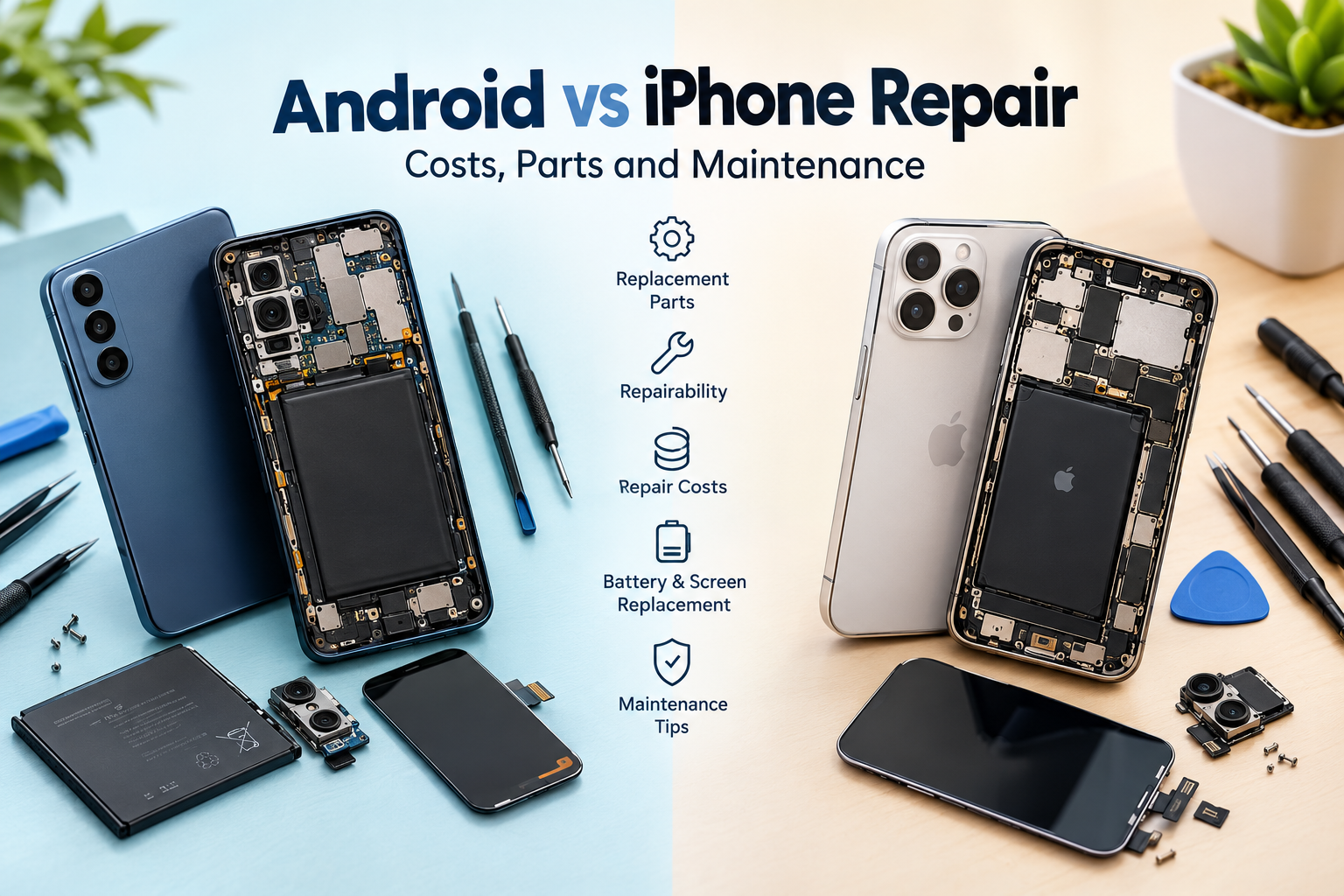
A damaged screen, a battery that drains too quickly, a faulty charging port, or an unexpected software problem can affect any smartphone. When these issues arise, understanding Android vs iPhone repair can help you decide whether to repair your existing device, replace it, or consider a different phone for your next purchase.
Android phones and iPhones differ in their hardware designs, replacement part availability, repair procedures, service options, and software support. However, it is not accurate to assume that every Android phone is cheaper or easier to repair than every iPhone. Repair difficulty and cost depend on the exact model, the type of damage, the quality of replacement components, and the repair provider.
This guide explains the key differences between Android and iPhone repairs, including screen and battery replacement, repair costs, genuine and third-party components, maintenance practices, and long-term ownership. It will help you make a practical decision based on your budget and the condition of your smartphone.
Android vs iPhone Repair: What Are the Main Differences?
The biggest difference is that Android is used by multiple manufacturers, while iPhones are designed within Apple’s hardware and software ecosystem. This affects how repairs are performed and where replacement components can be sourced.
Here are the main factors to consider:
-
Device design: Internal layouts, adhesive, screws, connectors, and component integration vary by model.
-
Parts availability: Popular phones may have more readily available replacement parts than discontinued or less common devices.
-
Repair procedures: Certain repairs require specialized tools, diagnostic equipment, calibration, or software configuration.
-
Service options: Both platforms may offer manufacturer-supported and independent repair options, depending on the device and region.
-
Repair costs: Component prices, labour charges, warranty coverage, and damage severity influence the final bill.
-
Software support: The remaining security and operating system support can affect whether repairing an older device is worthwhile.
For example, repairing a popular Samsung Galaxy phone may involve different procedures and parts from repairing a Google Pixel, Motorola, or Xiaomi model. Similarly, the repair process for an older iPhone may differ considerably from that of a newer generation.
The best comparison is therefore between specific phone models, not simply Android and iPhone as two categories.
Differences in Replacement Parts Availability
Android Phone Replacement Parts
Android phone replacement parts vary in availability across manufacturers, models, and markets. Screens, batteries, charging ports, cameras, speakers, and back covers may be readily available for popular models, while parts for discontinued or less common phones can take longer to source.
Samsung, Google Pixel, Motorola, Xiaomi, and other Android manufacturers have different service arrangements and parts distribution systems. Some devices have strong manufacturer-supported repair options, while independent repair providers may be important for sourcing components for other models.
Before approving a repair, confirm that the replacement part matches your exact model and variant. Two phones with similar names can use different displays, connectors, or internal components.
iPhone Replacement Parts
iPhone replacement parts are available through Apple’s repair channels and, where supported, independent repair providers. Access depends on the model, region, part type, and repair provider’s capabilities.
Depending on the specific iPhone, repairs may involve a screen assembly, battery, camera, charging connector assembly, or another internal component. Some repairs also require diagnostics, configuration, or calibration after installation.
Before choosing a provider, ask whether the proposed component is new, used genuine, or third-party, and whether any parts-related warnings or feature limitations may apply.
Genuine, Used, and Third-Party Parts
Replacement parts generally fall into three categories:
-
Genuine manufacturer-supplied parts: Sourced through manufacturer-supported channels, with compatibility and traceability depending on the supplier and repair process.
-
Used genuine parts: Previously installed components that may be reusable, subject to condition, compatibility, and model-specific restrictions.
-
Third-party parts: Components manufactured by suppliers other than the original phone manufacturer. Quality can vary between suppliers and product grades.
Genuine parts are not automatically the best choice in every situation, and third-party components are not all poor quality. The important considerations are compatibility, performance, reliability, warranty terms, and the reputation of the supplier.
For displays, ask about brightness, colour reproduction, touch responsiveness, and fingerprint or other sensor compatibility. For batteries, check the component’s quality, warranty, and suitability for the device.
Which Is Easier to Repair: Android or iPhone?
There is no universal winner in smartphone repairability. A phone’s internal design and the repair procedure for the particular component usually matter more than its operating system.
Smartphone Design and Internal Components
Some phones are designed with relatively accessible internal components, while others use strong adhesives, compact layouts, or highly integrated assemblies. These features can make disassembly and component replacement more complicated.
The technician may need to remove the back cover carefully, disconnect delicate flex cables, manage adhesive, or access components located beneath other assemblies. A mistake during disassembly can damage the display, connectors, or surrounding components.
This applies to both Android phones and iPhones. A model-specific repair guide and the right tools are important for reducing unnecessary damage.
Screen and Battery Replacement
Android screen repair can range from a straightforward replacement to a complex procedure involving a curved OLED display or an integrated display assembly. The same applies to iPhone screen repairs, where the model and display design determine the procedure.
Battery replacement also varies. Adhesive strips, tightly packed components, and the accessibility of battery connectors can affect the amount of labour required. Some repairs may require new seals or additional configuration steps.
After either repair, water resistance should not be assumed to remain unchanged. Proper resealing helps, but the original protection may not be fully restored, particularly if the phone has suffered impact or structural damage.
Software Pairing, Calibration, and Repair Restrictions
Some modern smartphones use software configuration, component verification, or calibration after particular repairs. Depending on the model and component, this may affect warnings, diagnostics, or access to certain functions.
These requirements are not identical across all iPhones or Android phones. Before a repair, ask whether post-repair configuration is necessary and whether the provider can complete the relevant checks.
A reliable technician should explain any known limitations instead of promising that every feature will work exactly as before.
Android vs iPhone Repair Costs
The cost of repairing a phone depends on the damaged component, the device’s age, part availability, labour, and the repair provider. Neither Android nor iPhone is always the cheaper option.
iPhone repair costs can be influenced by premium display assemblies, model-specific components, and post-repair procedures. Android repair costs vary widely because Android phones range from budget devices to premium foldable smartphones.
Other factors include:
-
Whether the screen uses LCD or OLED technology.
-
Whether the repair requires replacing an entire assembly or an individual component.
-
The availability of compatible replacement parts.
-
The difference between manufacturer-authorized and independent repair pricing.
-
Warranty coverage, labour charges, and applicable taxes.
Screen Replacement Costs
The iPhone screen replacement cost depends on the model, display technology, and the extent of the damage. A premium OLED screen can cost more to replace than a basic LCD panel, regardless of the operating system.
Similarly, Android screen repair costs can vary substantially between an entry-level smartphone, a premium Samsung Galaxy device, a Google Pixel, and a foldable phone.
Before approving a screen replacement, request an itemized quote covering the display, labour, calibration, and warranty. Ask whether the replacement preserves the expected touch response, brightness, colour quality, and supported fingerprint functions.
Battery Replacement Costs
The cost of smartphone battery replacement depends on the battery’s availability, adhesive design, labour requirements, and device condition.
A battery replacement may be economical when the phone otherwise performs well and continues to receive security updates. However, damage to the frame, charging circuit, or other components may increase the total repair bill.
Always compare the complete quote rather than choosing a provider based only on the lowest advertised battery price.
When Is Repair More Economical Than Replacement?
Repair is often worth considering when the fault is limited to a replaceable component and the rest of the phone remains reliable.
Use this checklist before deciding:
-
Compare the total repair quote with the price of a comparable replacement phone.
-
Check how much software and security support the existing phone has left.
-
Consider its performance, storage, battery condition, and physical damage.
-
Confirm whether the repair affects existing warranty coverage.
-
Evaluate how long you expect to keep using the device.
If several major components are damaged or the phone is approaching the end of its useful life, replacement may be more practical. A professional diagnosis can help you compare the options.
Official Repair Centres vs Independent Repair Shops
Choosing between official vs independent phone repair involves more than comparing prices. Both options can be suitable, depending on the device, fault, warranty status, and provider’s capabilities.
| Factor | Manufacturer-authorized service | Independent repair shop |
|---|---|---|
| Parts | Access to manufacturer-supported parts and procedures | May use genuine, used genuine, or third-party parts |
| Pricing | Depends on the manufacturer’s service pricing and coverage | Varies by shop, component, and labour |
| Diagnostics | Manufacturer-supported diagnostic processes where applicable | Depends on available tools and technician expertise |
| Repair warranty | Subject to manufacturer service terms | Subject to the shop’s own warranty terms |
| Repair flexibility | Depends on approved service procedures | May offer more repair approaches, depending on capability |
| Availability | Varies by location and service network | Varies by local repair ecosystem |
Apple documents its repair options, genuine parts, and post-repair procedures through its official support resources. You can review Apple’s iPhone Parts and Service History guide to understand how certain repairs and replacement components may be identified on supported devices.
For Android phones, service options and parts access vary by manufacturer. Samsung provides model-specific repair information and service resources, which you can explore through its Galaxmial
Before handing over your phone, back up important data, ask how your personal information will be handled, and understand whether the repair requires access to your device passcode. Obtain a written quote and confirm the repair warranty, expected completion time, and parts being installed.
Software Support and Its Impact on Repairability
A phone can remain physically repairable even when its software support is ending. However, the value of repairing an older device depends partly on whether it can continue running apps securely and reliably.
Consider these factors:
-
Operating system updates: Determine whether the manufacturer still provides updates for your exact model.
-
Security patches: A phone without current security support may be less suitable for sensitive activities.
-
App compatibility: Some applications may eventually require newer operating system versions.
-
Parts availability: Older phones may become more difficult or expensive to repair as components become scarce.
-
Device performance: Limited storage, worn batteries, and aging hardware can reduce the benefits of a repair.
Android update policies vary by manufacturer and model, while iPhone support also depends on the specific generation. Avoid assuming that all devices receive the same support period.
Before spending money on a repair, check the manufacturer’s current support information for your model. Extending a phone’s useful life through a suitable repair can reduce waste and postpone the expense of buying another device.
Android vs iPhone Maintenance Requirements
Good maintenance habits help reduce avoidable damage on both platforms. Although the settings differ, the basic principles of battery care, physical protection, and software management remain similar.
Battery Health and Charging Habits
Heat and normal battery aging can reduce battery performance over time. Use reputable, compatible charging accessories and avoid exposing your phone to excessive heat, such as leaving it in direct sunlight for extended periods.
If your phone repeatedly shuts down, becomes unusually hot, or loses charge much faster than before, investigate the cause rather than immediately assuming the battery is faulty.
Both Android and iPhone models may offer battery health or usage information, but the available features vary. Follow the manufacturer’s charging recommendations for your particular device.
Screen, Ports, and Physical Protection
A protective case and suitable screen protector can reduce the risk of everyday damage, although neither guarantees that a phone will survive a fall.
Keep charging ports free from accumulated debris. Follow the manufacturer’s cleaning instructions and avoid inserting metal objects into the port or applying liquids and aggressive cleaning products.
If a cable repeatedly disconnects, inspect the cable and connector for damage before assuming the phone’s charging port needs replacement.
Software Updates and Storage Management
Install compatible software and security updates, remove applications you no longer need, and keep sufficient free storage for normal device operation.
Regular backups are especially important before a repair, software reset, or major update. A backup helps protect personal photos, contacts, and documents if troubleshooting requires data to be erased.
If a phone becomes slow, check storage usage, battery condition, and recently installed apps before assuming that hardware replacement is necessary.
Water Resistance and Preventive Care
Water resistance is not a permanent guarantee against liquid damage. It can be affected by aging seals, drops, cracks, and previous repairs.
Do not deliberately expose a phone to water simply because it has a water-resistance rating. If liquid enters the device, avoid charging it until it has been assessed and follow the manufacturer’s liquid-damage guidance.
A phone that has previously undergone screen or back-cover replacement should not automatically be assumed to retain its original level of water resistance.
Common Repairs for Android Phones and iPhones
The following table outlines common faults and the main considerations when diagnosing them. Actual repair requirements depend on the model and the underlying cause.
| Repair type | Android phones | iPhones |
|---|---|---|
| Screen replacement | Display technology, frame damage, and part availability affect the repair | Display assembly, model-specific procedures, and calibration may matter |
| Battery replacement | Battery condition, adhesive, and compatible parts determine the work | Battery condition, adhesive, model requirements, and post-repair checks matter |
| Charging-port problems | Could involve debris, a damaged connector, a cable, or charging circuitry | Could involve debris, a damaged connector, a cable, or charging circuitry |
| Camera issues | May involve the camera module, lens, connector, or software | May involve the camera module, lens, connector, or software configuration |
| Speaker and microphone faults | Requires checking the component, openings, connections, and software | Requires checking the component, openings, connections, and software |
| Water or liquid damage | Requires assessment of affected components and possible corrosion | Requires assessment of affected components and possible corrosion |
| Software-related problems | May involve apps, storage, updates, or operating system faults | May involve apps, storage, updates, or operating system faults |
A professional diagnosis is particularly important for charging and liquid-damage problems because symptoms can have multiple causes. Replacing a component without identifying the underlying fault may not resolve the issue.
Which Phone Is Better for Long-Term Repair and Maintenance?
There is no single answer for every user. The best choice depends on the particular model, local service options, expected ownership period, and total cost of keeping the phone functional.
Before purchasing a phone, consider the following:
-
Repair prices: Research the likely cost of replacing the screen, battery, and other commonly damaged components.
-
Local service availability: Check whether qualified technicians can service your chosen model.
-
Parts supply: Consider how easily replacement components can be sourced and how long delivery might take.
-
Manufacturer support: Review repair options, service policies, and warranty conditions.
-
Software updates: Check the model’s published security and operating system support commitments.
-
Battery replacement: Find out whether a replacement is available and what the likely service process involves.
-
Resale value: Consider how repair history and physical condition may affect the phone’s future value.
A premium Android phone may be expensive to repair, while a less expensive Android model may have limited parts availability. An iPhone may offer suitable repair options in one location but be less convenient to service in another.
The most useful approach is to compare the complete ownership costs of specific models rather than relying on general claims about either platform.
Conclusion
The comparison of Android vs iPhone repair comes down to parts availability, device design, repair procedures, service options, costs, and remaining software support.
Android phones offer a wide range of designs and price points, so their repair experiences can differ considerably by manufacturer and model. iPhones have model-specific repair requirements and manufacturer-supported service options, but independent repair possibilities and component availability also matter.
Neither platform is automatically cheaper or easier to maintain. Before choosing a repair, compare written quotes, confirm the replacement part’s quality, understand the warranty, and consider how long the phone will remain useful.
This guide from Galaxmial aims to help smartphone users make informed decisions about device repair and long-term maintenance. With careful maintenance and a suitable repair provider, many smartphone problems can be addressed without replacing the entire device.
Battery Replacement Service
Battery Replacement Service
A smartphone that once opened apps instantly may gradually start responding more slowly,…
Read More
Mobile Repairing Shop
Introduction A smartphone that restarts unexpectedly can interrupt important calls, close applications, disrupt online…
Read More